How do you upgrade an old Angular app?
Upgrade an old Angular app one major version at a time, with ng update and the official update guide for each step. Check Node.js and TypeScript at every step, run the tests, ship, then move to the next version.
From version 22, each Angular major version is supported for about 24 months: 12 months active, then 12 months of long-term support. Versions 20 and 21 get about 18 months. Versions 2 to 19 no longer get updates.
From my work
At Itmatched we upgraded both the Node back end and the Angular front end, along with a new UI and a new architecture. It took about six months. The product was not live yet, so downtime was not an issue.
At Mom Software the app was on Angular 10, followed no pattern and carried a lot of dead code and unused libraries. Rather than step it up version by version, we started again on a Fuse template and moved the old code over module by module.
Where you stand in November 2026
- Angular 22 is the active version, released on 3 June 2026.
- Angular 21 and 20 are in long-term support. Support for 20 ends on 28 November 2026. After that day, 21 is the oldest supported version, until June 2027.
- Anything from 2 to 19 gets no more fixes, security fixes included.
- From version 22, Angular plans one major release a year. Before that it was every six months. Version 23 is planned for June 2027.
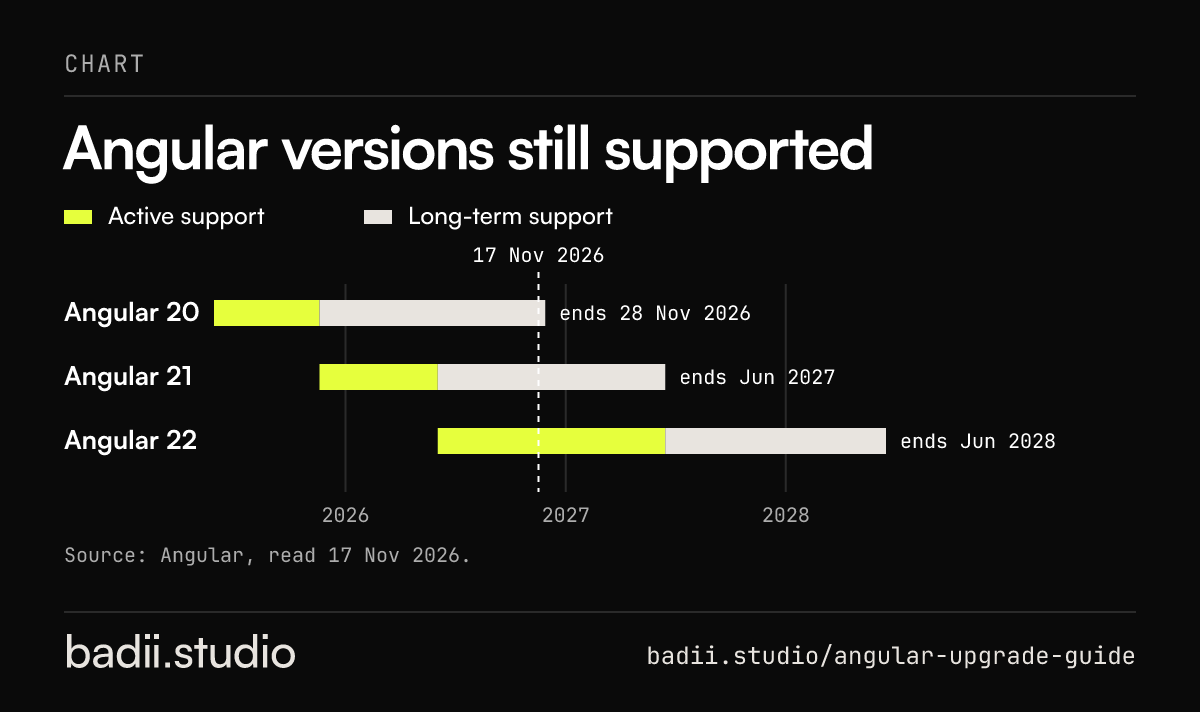
The numbers as text
- Angular 20: Active support from 28 May 2025 to 19 Nov 2025, Long-term support until 28 Nov 2026
- Angular 21: Active support from 19 Nov 2025 to 3 Jun 2026, Long-term support until Jun 2027
- Angular 22: Active support from 3 Jun 2026 to Jun 2027, Long-term support until Jun 2028
Cite as: badii.studio, "Angular versions still supported", https://badii.studio/angular-upgrade-guide#angular-support-timeline
Before you start
- Run ng version and write down the Angular, CLI, Node.js and TypeScript versions.
- List every third-party Angular library and the Angular versions each one supports.
- Get the tests passing, or write end-to-end tests on the main flows if there are none. On an app this old, expect there are none.
- Start from a clean git branch. ng update refuses to run with uncommitted changes unless you pass --allow-dirty.
The Angular upgrade, one version at a time
Angular’s own policy says: to update across several major versions, do it one major version at a time. Their example is going from 10 to 12 through 11.
On an old app, most of the steps in between land on versions that are already out of support. Treat them as stops on the way, and do not leave production on one.
- Update to the latest patch of your current major version first.
- Open the update guide at angular.dev/update-guide, pick your from and to versions, and read the steps.
- Check the version compatibility table on angular.dev for the Node.js and TypeScript versions the next major needs.
- Run ng update @angular/core@N @angular/cli@N, where N is the next major version. Add --create-commits to get a commit per migration.
- Update Angular Material and other Angular libraries to the matching version.
- Fix what the automatic migrations could not, run the tests, and ship.
- Repeat for the next version. It is repetitive on purpose: when something breaks, you know which step did it.
Node.js and TypeScript move with you
The jumps are bigger than they look. Angular 10 runs on Node.js 10.13 or 12.11 and TypeScript 3.9 or 4.0. Angular 22 needs Node.js 22.22.3, 24.15 or 26 and TypeScript 6.0. Plan the Node.js upgrades for your build servers and hosting as part of the work. Learning about them halfway through, from a failed build, is the expensive way.
AngularJS is a different job
AngularJS, the 1.x versions, is a different framework. ng update cannot move it to Angular. Its long-term support ended on 31 December 2021. You either run both side by side with ngUpgrade and move it over piece by piece, or rebuild it. The AngularJS to Angular migration guide covers the cost, the time and the steps for that job.
When to rebuild instead of upgrading
- The code follows no pattern, so each version step means fixing the same mess again.
- Key libraries were abandoned and have no version for newer Angular.
- Much of the code is dead, and nobody knows which parts.
When not to upgrade right now
If the app is on a supported version and the team ships on it without trouble, upgrade on a schedule and skip the rush. A yearly upgrade to the next major is small. Five versions at once is a project.
Questions people ask
Is Angular end of life?
No. Angular 22 is in active support and 21 is in long-term support until June 2027. What is end of life is every version from 2 to 19, and version 20 joins them on 28 November 2026. AngularJS, the 1.x line, ended in January 2022.
Is Angular still relevant in 2026?
Yes. Its core package was downloaded 27.5 million times from npm in October 2026, up from 19 million in October 2025. It ships on a published schedule: version 22 came out in June 2026 and version 23 is planned for June 2027.
Should we move to React or Next.js instead of upgrading?
An upgrade is almost always the smaller job, because your code, your tests and your team’s habits stay. Changing framework means rewriting every screen, and I would not do that to fix a version number. It is worth it when you cannot hire for Angular where you are, or when the app needs a rebuild anyway.
Do you do the upgrade as a service?
Yes. It starts with the 14-day Trial, $995: in the first 5 business days you get the version path, the libraries that block it and the risks, ranked. I make the first steps in the days left. The rest runs as tasks on a monthly plan.
Read next
Sources
- Angular, Releases and support policy, read 17 Nov 2026
- Angular, Update guide, read 17 Nov 2026
- Angular, ng update, seen 17 Nov 2026
- Angular, Version compatibility, read 17 Nov 2026
- npm, downloads of @angular/core, read 17 Nov 2026